
[PR]上記の広告は3ヶ月以上新規記事投稿のないブログに表示されています。新しい記事を書く事で広告が消えます。
Over the last few years, many cell phones have become available that allow users to access the internet while on the move. This mobile internet is enabled via technology, such as WiFi (Wireless Local Area Network) and WAP (Wireless Access Protocol). Recent figures from analysts at the Internet Data Center suggest that some 450 million people in the world use mobile internet.
Stay Up-To-Date
Perhaps the biggest advantage of mobile internet is always having access to the latest facts, figures and information as it happens. This information might range from breaking news delivered by news sites, to stock and shares prices or other business information, to travel updates and the latest weather forecasts in your area. Having up-to-date info allows you to make decisions with all the correct facts at hand.
Find Yourself
Another practical use of mobile internet is to find information regarding the area around you. For example, you might want to find the nearest restaurant, gig or bar and your mobile internet could tell you with a quick look on a search engine. You could then get recommendations and find a map. Many phones also come set up to utilize GPS (Global Positioning System), which uses satellites to locate the phone's user and provide information based on their location. This means the info you obtain using mobile internet can be personalized for you and is thus more helpful, especially if, for example, you are lost on the road and need directions home.
Go Social
With many people now using social networking sites, such as Twitter and Facebook, mobile internet can only make engaging with contacts on these sites easier. In particular, having the net on your cell phone allows you to update your status or check what your friends are up to at the touch of a button---handy for organizing your social life.
Money Matters
Something to consider is the added cost of mobile internet. For some phones, depending upon your phone network or carrier, having your phone enabled for the internet may cost an extra $7 to $10, while a monthly subscription for a smartphone---let's say the Nexus One, for example---might get you unlimited access to the internet, but will also set you back around $79.99 per month.
Privacy Issues
There are privacy issues to consider, too. With more and more people accessing the internet through mobiles, it's easy to forget that five of the major search engines archive the search histories of their users on a regular basis, according to a report from the Center for Democracy & Technology. So individuals may be giving away more information than they realize through their increased net usage.
l Fujitsu FPCBP434 battery for Fujitsu LifeBook AH544 E733 E734 S904 Series
l NEC PC-VP-BP90 battery for Nec PC-VP-BP90 OP-570-77012 series
l Dell MPX3V Computer Power Supply
HP 504965- 001 Computer Power Supply
LENOVO FSP180-50PLV Computer Power Supply
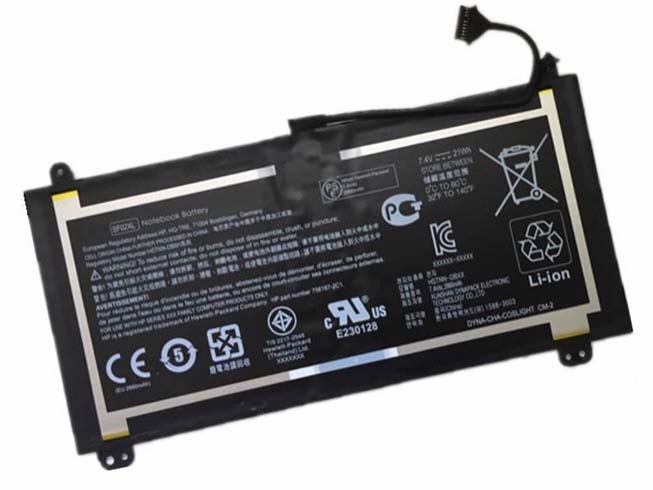
Replacement Battery>> HP HSTNN-DB6H
Replace the following part numbers:
HSTNN-DB6H
Fits the Following Models:
SF02X
We promise to explain, in plain English, what works we’ll carry out, we treat every customer with respect.
We promise to offer high quality products at the lowest-possible prices.
JP Store: HP HSTNN-DB6H battery
Laptop AKKU: AKKUS Für HP, HP HSTNN-DB6H AKKU HP SF02XL.
HP HSTNN-DB6H Our brand new 7.4V 21Wh replacement battery for HP HSTNN-DB6H notebook is made with high-grade Li-ion cells from Samsung, LG, Panasonic to ensure maximum performance. This replacement HP HSTNN-DB6H battery pack is specially designed with multiple-protection circuit for maximum safety. The housing of the HP HSTNN-DB6H battery pack is made of non flammable and very durable plastic, which is fire retarded and avoids damage when dropped from low heights. All our high quality replacement batteries for HP HSTNN-DB6H laptop have been tested and proven to match and/or exceed original HP battery performance and are 100% compatible with Original Manufacturer Specifications. Every piece of our replacement battery for HP HSTNN-DB6H has been tested and validated on HSTNN-DB6H systems to ensure the safety for your HP laptop. This battery for HP HSTNN-DB6H comes with 1-Year limited warranty. Thank you for purchasing this high quality replacement HP HSTNN-DB6H notebook battery at uk-online.co.uk.FUJITSU SQU-810 battery for FUJITSU NOBi Intel 8.9inch Classmate Convertible netbook
HP Ba06xl battery for Hp Elitebook Folio 9470m Ultraslim Slice
Asus C31-X402 battery for Asus VivoBook S400 S400C S400CA S400E
IBM 81Y2432 battery for IBM 59Y5260 DS5020 DS5000 DS5100 Backup Unit 1.1Ah 7.26Wh
dell C565C battery for Dell Precision M6500 Dell Precision M6400
APPLE 020-7149-A battery for APPLE MacBook Pro 17 A1383
MSI MS-1682 battery for MSI A6200 CR600 CR610 CR620 CX600 CX700
IBM 44V7597 battery for IBM 44V7597 Brand New 74Y6124 74y5997 42r8705
Dell 191YN battery for DELL Alienware 15 (ALW15ED-1828)191YN ALW15ED
asus C21-TF201D battery for ASUS C21-TF201D
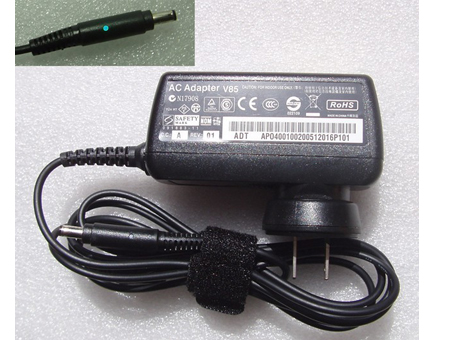
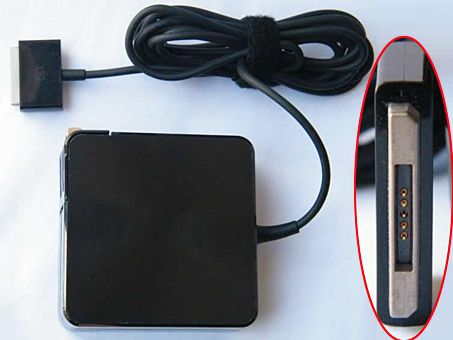
| Product Details | |
|---|---|
| Brand: | ASUS Power Adapters |
| SKU: | ASU20576 |
| Input Voltage: | 19V 3.42A 65W |
| DC Outpu: | 100-240V 50-60Hz |
| Color: | black |
| Connector: | 5PIN |
1. Keep the laptop unplugged. If you use your dell laptop as a desktop replacement, try unplugging it when it's not in use. Take care to unplug the charger from the wall too; otherwise, it consumes electricity.
2. Only charge it when it needs charging. Keeping the laptop charging all the time actually weakens the battery's power. Soon enough, you'll have to keep it plugged in all the time which is exactly what you're trying to avoid. Be sure to only charge it when the laptop tells you it needs charging and unplug the charger when the battery is full.
3. Remove the battery of the laptop. It should be located on the bottom side of the laptop. You might need to slide some clips along to allow the battery to be removed. You will, however, have to keep your laptop plugged in all the time, but this method makes the battery last longer.
a) Use the battery only when you need to take your laptop outdoors.
b) Make sure the battery is charged up to at least 70% before you remove it from the computer. This keeps it ready for use, and it eliminates the possibility of it being drained when you need it.
4. Turn off the laptop and unplug it when it's not in use. If you need to step out of the room for more than half an hour, it's best to save electricity and the battery by shutting it down.
5. For long term storage, lithium-ion batteries should be at least half-charged. Store them safely in a warm, dry location.
Ø 3200mAh/35Wh 11.1V New Battery Asus C32-TAICHI21 For Asus Ultrabook Taichi 21
Ø 32wh 14.8V New Battery Clevo W950BAT-4 For Clevo 6-87-W95KS-42F 14.8V 32WH
Ø 3950mAh/43WH 11.1V New Battery Dell GK5KY For DELL Inspiron 13 7347 serie